
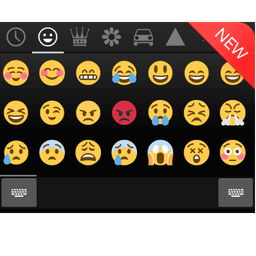
Screenshots
About Emoji Keyboard - CrazyCorn
Transform your typing experience with an emoji keyboard that brings personality and expression to every message. Emoji Keyboard - CrazyCorn is a beautiful, customizable input solution that lets you insert emojis anywhere—from social media apps like Facebook and Twitter to messaging platforms and beyond.
Enjoy stunning visual design inspired by modern Android aesthetics. The clean, intuitive interface makes finding and selecting emojis effortless, while gesture slide input lets you navigate through emoji collections with smooth, natural gestures. Whether you're looking for colorful emoji, the classic Android 4.4 style, or minimalist black and white designs, choose the visual theme that matches your mood and device.
Personalize every aspect of your keyboard to reflect your unique style. Customize key text colors, background colors, and the keyboard backdrop itself. Set your favorite picture as a keyboard wallpaper for a truly personalized typing experience. Adjust suggestion and preview colors to create the perfect visual harmony. The app supports three distinct emoji styles—colorful, Android 4.4, and black/white—ensuring compatibility and visual preference for all users.
Beyond standard emoji, Emoji Keyboard - CrazyCorn includes support for emoji text faces and funny emoji art, adding creative flair to your communications. English input suggestions help you type faster and more accurately, with plans to expand language support in future updates. The keyboard supports an extensive range of languages including English, Spanish, French, Portuguese, Russian, Arabic, Chinese, and many more, making it accessible globally.
The free version gives you access to two pages of emoji and all core customization features. Want unlimited emoji access? Upgrade to the pro version for expanded emoji libraries and additional features. Installation is straightforward—simply enable the keyboard in your system input settings and set it as your default input method through the app.
Note: Emoji visibility depends on your Android version (4.1 and above recommended). If you're using a Samsung device and can't see black and white emoji, install the optional font add-on through system settings. For older devices, contact support for compatibility assistance.
Elevate your messaging with Emoji Keyboard - CrazyCorn and express yourself like never before.
Pros & Cons
Pros
- Extensive customization options for colors, wallpapers, and visual themes
- Gesture-based navigation makes browsing emoji collections smooth and fast
- Supports multiple emoji styles including colorful, Android 4.4, and monochrome
- Works across messaging, social media, and third-party apps seamlessly
Cons
- Free version limits you to two pages of emoji; full library requires paid upgrade
- Black and white emoji may not display on Samsung devices without additional font installation
- Emoji visibility and appearance vary significantly based on Android version (4.1+ recommended)
- Language support currently limited; English input suggestions only, other languages planned
Related Apps

Educate Magis
Educate Magis
Connect with Jesuit educators worldwide—share insights, access global stories, and collaborate internationally.

Tap - Digital Business Card
Tap-Digital Business Card LLC
Digital business card app with lead capture, CRM sync, and team management for professionals.

TeamSpeak 3 (Cliente)
Low-latency voice chat for gaming teams and communities — private servers, text chat, and file sharing.

IFFCO Echo
IFFCO Group
Internal communication and approval management for IFFCO employees — stay connected and collaborate.

Video Branch
IndusInd Bank Ltd.
Video banking with face-to-face consultations — connect with your bank manager anytime, anywhere.

تواصل
وزارة التعليم - Ministry of Education
Contact Ministry of Education officials directly. Submit proposals, track inquiries, and get SMS updates.
Latest Articles

Best AI admin task automation apps for desktop in 2026 (we tested 7)
Jul 11, 2026

Best AI coding tutor apps for desktop in 2026 (we tested 7)
Jul 11, 2026

Best apps for the *arr media stack on desktop in 2026 (we tested 7)
Jul 11, 2026

Best classic Doom source port apps for desktop in 2026 (we tested 7)
Jul 11, 2026

Best FFXIV companion apps for desktop in 2026 (we tested 7)
Jul 11, 2026